
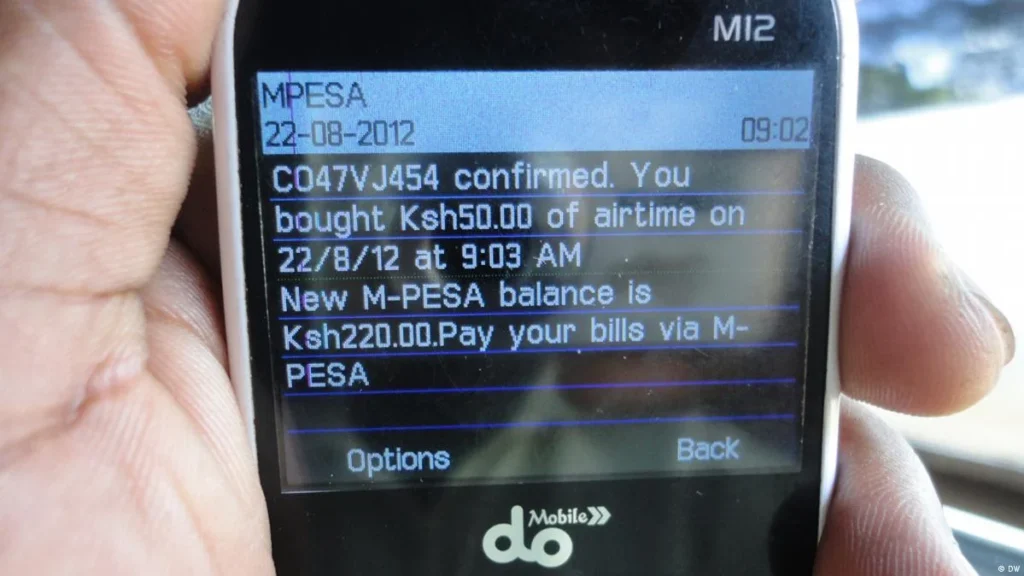

If you accidentally send money to the wrong number, you may be able to recover it through an M-Pesa reversal. For Safaricom Kenya users, one of the simplest methods is to forward the original transaction confirmation SMS to 456 and follow the instructions provided by Safaricom.
You should act as soon as you notice the mistake. A successful reversal is not guaranteed because the recipient’s account status, transaction type, and cooperation may affect the outcome. This guide explains how to request a reversal, what to do when it fails, and how to avoid similar mistakes.
What Is an M-Pesa Reversal?
An M-Pesa reversal is a process used to recover money sent through an incorrect or mistaken transaction. For example, you might enter the wrong phone number, send more money than intended, or accidentally pay the wrong recipient.
Safaricom reviews the reversal request and may contact the recipient before returning the funds. The money does not automatically return simply because you report the mistake.
There are different procedures for personal transfers, Paybill payments, and Buy Goods transactions. Understanding which type of payment you made will help you choose the right support channel.
How to Reverse Money on M-Pesa Using SMS
The SMS method is a convenient starting point if you have accidentally transferred money to another Safaricom number. You do not need a smartphone or mobile data to forward the confirmation message.
Follow these steps:
- Open the messaging application on your phone.
- Find the original M-Pesa confirmation message for the incorrect transaction.
- Select the message and choose the forward option.
- Enter 456 as the recipient.
- Send the complete confirmation message.
- Wait for a response from Safaricom’s reversal service.
- Follow any further instructions provided in the official message.
Make sure you forward the original transaction message instead of typing the transaction details manually. The confirmation contains information that helps Safaricom identify the payment.
Keep your transaction ID and other details available in case customer support requests them.
Important: Sending the message to 456 starts a reversal request. It does not mean the money has already been returned. Wait for an official confirmation of the outcome.
How to Reverse Money Through the M-Pesa App
You can also request a reversal through the M-Pesa app. This option is useful when you have completed a transaction using the app and immediately notice an error.
Here is the general process:
- Open the M-Pesa app on your phone.
- Complete the transaction review and locate the recent payment.
- Look for the Reverse Transaction option if it is available.
- Select the reason for requesting the reversal, such as an incorrect recipient or amount.
- Review the information and confirm your request.
- Wait for a notification explaining the next steps.
The app-based reversal option may have eligibility restrictions. For example, the transaction may need to have been initiated through the app. If you cannot see the option, use the SMS method or contact Safaricom directly.
You should also check that you are using the official application. Avoid downloading unofficial apps that claim to recover lost M-Pesa funds.
How to Reverse Money Using mySafaricom
Another option is the mySafaricom app. It provides access to Safaricom services and account-related features.
If you made an incorrect transaction through the app, check whether the reversal option is available.
Follow these steps:
- Open the mySafaricom app.
- Sign in using your registered account.
- Locate the recent M-Pesa transaction.
- Select the reversal option if available.
- Confirm your request and wait for the response.
The available options can depend on how and when the transaction was completed. If the transaction does not qualify for an in-app reversal, contact customer care with your transaction reference.
How to Contact Safaricom if Your Reversal Request Fails
Sometimes, forwarding the confirmation message does not resolve the problem. The recipient may have already used the funds, the payment may involve a business account, or additional verification may be required.
In these situations, contact Safaricom through its official support channels.
For Safaricom Kenya customers, the commonly published customer care numbers include:
- 100: Prepaid customer care.
- 200: Postpaid customer care.
You can also visit a Safaricom retail shop for assistance. Carry your original identification document and keep the transaction confirmation available.
When contacting support, explain:
- Your M-Pesa transaction code.
- The amount transferred.
- The recipient’s phone number or payment account.
- The date and approximate time of the transaction.
- Why you believe the payment was incorrect.
Do not share your M-Pesa PIN or one-time security codes with anyone claiming to be a customer care agent.
What Happens If the Recipient Has Already Withdrawn the Money?
A common concern is whether you can recover money after the recipient has withdrawn it.
The answer depends on the circumstances. If the recipient has already withdrawn or spent the funds, an automatic reversal may become difficult or unsuccessful.
Contact Safaricom immediately and explain what happened. Provide the transaction code and ask whether the company can investigate the payment.
If the recipient refuses to cooperate, Safaricom has advised customers to contact the recipient directly for a refund or report the dispute to the police for assistance. Keep any relevant messages and transaction records.
Do not threaten the recipient or attempt to access their account. Use the official dispute and reporting process instead.
Can You Reverse an M-Pesa Paybill or Buy Goods Payment?
Paybill and Buy Goods payments can require a different reversal process from ordinary person-to-person transfers.
If you accidentally pay the wrong business, contact Safaricom customer care and provide the transaction details. You can also contact the business that received the payment to explain the mistake.
For a Buy Goods payment, Safaricom’s business support information explains that customer care contacts the merchant and seeks permission before reversing funds received through a business Till.
Keep the following information ready:
- The Paybill or Till number.
- The account number, if applicable.
- The transaction confirmation code.
- The amount paid.
- The date and time of payment.
Do not assume that forwarding a personal transfer confirmation to 456 will automatically reverse a business payment. Ask Safaricom which process applies to your particular transaction.
How Long Does an M-Pesa Reversal Take?
The time required for an M-Pesa reversal depends on the transaction and the response from the recipient.
For app-based reversal requests, Safaricom’s published procedure has described an initial notification within approximately two minutes and a further status update within two hours. These are communication targets, not a guarantee that the money will be returned within two hours.
Here are some factors that may affect the process:
- Whether the original transaction can be identified.
- Whether the recipient still has the money.
- Whether the recipient responds to Safaricom.
- Whether the transaction was a personal transfer or business payment.
- Whether additional investigation is needed.
Keep checking your official M-Pesa messages for updates. If you do not receive a response, contact customer care and provide your original transaction reference.
Common Reasons Why an M-Pesa Reversal Fails
A reversal request can fail for several reasons. Understanding the problem can help you decide what to do next.

1. The Recipient Has Already Used the Money
If the recipient has withdrawn or spent the transferred funds, recovering the full amount can become difficult. Contact Safaricom and explain the situation.
2. You Entered Incorrect Transaction Details
An incorrect transaction code or incomplete confirmation message can make it harder to identify the payment. Always use the original SMS when submitting your request.
3. The Recipient Refuses the Reversal
Some recipients may cancel or dispute a reversal request. If this happens, contact the person directly for a refund. If the matter remains unresolved, report it to the police and keep the relevant transaction records.
4. You Used the Wrong Reversal Channel
A person-to-person transfer, Paybill payment, and Till payment may follow different procedures. Make sure you explain the exact transaction type when requesting assistance.
How to Avoid Sending Money to the Wrong M-Pesa Number
The best way to prevent a reversal problem is to check the transaction details before confirming a payment.
Safaricom provides a feature called Hakikisha, which allows users to check the intended recipient’s name before completing an eligible transaction.
Follow these precautions:
- Check the recipient’s phone number before entering the amount.
- Read the displayed recipient name carefully.
- Confirm the amount before entering your M-Pesa PIN.
- Never rush when making a large payment.
- Keep your transaction confirmation messages until you are sure the payment was successful.
- Never share your PIN with another person.
You should also be careful when someone calls claiming they accidentally sent money to your number. Check your actual M-Pesa balance and transaction history before taking any action. Never send money back simply because a stranger asks you to do so.
How to Reverse Money on M-Pesa Safely
If you have sent money to the wrong number, start by keeping your original confirmation SMS and forwarding it to 456 if you are using the Safaricom Kenya service. You can also check the reversal option in the M-Pesa or mySafaricom app.
If the request does not work, contact Safaricom through its official customer care channels and provide your transaction details. Remember that a reversal request does not guarantee a refund, especially when the recipient has already used the funds or disputes the transaction.
Avoid unofficial recovery services and anyone asking for your M-Pesa PIN. Acting quickly and following the correct process gives you the best opportunity to resolve an incorrect payment.
What If You Sent Money to an Inactive M-Pesa Number?
Sending money to an inactive or unavailable phone number can create a different problem from sending money to an active recipient.
Do not assume that the money will automatically return. Keep your confirmation message and contact Safaricom to request assistance.
In some cases, Safaricom may ask you to visit a retail shop with your original identification document to verify your identity and investigate the transaction. Follow the instructions provided through its official channels.
How to Identify Fake M-Pesa Reversal Services
People who have accidentally transferred money can become targets for scammers. Some fraudsters pretend to work for Safaricom and promise to recover the money in exchange for a fee or account details.
Protect yourself by following these precautions:
- Never give your M-Pesa PIN to someone claiming to reverse a transaction.
- Do not share an OTP or security verification code.
- Avoid paying strangers who promise guaranteed refunds.
- Do not install applications sent by unknown customer care agents.
- Verify support numbers through Safaricom’s official website.
- Do not trust screenshots as proof that someone has returned money.
A genuine reversal request should be handled through official M-Pesa channels. If you suspect fraud, report the incident to Safaricom and the appropriate authorities.
Important Information for M-Pesa Users Outside Kenya
M-Pesa operates in different countries, and its services are not identical everywhere. This guide primarily covers Safaricom Kenya because its SMS reversal procedure and customer support channels are specific to that service.
If you use M-Pesa in Tanzania or another supported market, check with your local operator before following the instructions in this article. The reversal number, available applications, and customer support procedures may differ.
US-based readers researching M-Pesa should also understand that the Safaricom 456 procedure is intended for the relevant Kenyan service, not a general US payment reversal method.